
How to Enroll in Amazon Vine Program: Proven Step-by-Step Strategy for Sellers (2026):
Struggling to get early reviews for your Amazon products? The Amazon Vine program lets you receive up to 30 honest reviews from trusted Vine Voices in exchange for free units. Here’s exactly how to take Vine program on Amazon as a seller.
What is Amazon Vine?
Amazon Vine is an invitation-only review program. Sellers enroll eligible products, and selected reviewers (Vine Voices) get the items for free and post unbiased reviews labeled as “Vine Customer Review of Free Product.”
It helps new or low-review products gain credibility and improve rankings faster.The Amazon Vine program is one of the most effective (and policy-compliant) ways to get early, high-quality reviews for new products. It connects your listings with trusted reviewers (Vine Voices) who provide honest feedback.If you’re planning a product launch in 2026, understanding how to properly enroll and use Amazon Vine can give you a significant competitive advantage.
Why amazon Vine matters?
Amazon Vine is not just another review system—it is one of the few fully Amazon-approved ways to get reviews without violating policies. Unlike traditional methods that may risk account suspension, Vine operates within Amazon’s ecosystem, ensuring compliance and transparency.
These reviews are clearly labeled, which adds authenticity and builds trust with potential buyers.
Eligibility Requirements
Before enrolling, ensure you meet these:
Professional Selling Account (not Individual plan)
Amazon Brand Registry enrollment (Brand Representative or Reseller role)
Products fulfilled by FBA with available inventory
Product has fewer than 30 reviews
Listing includes title, images, description, and proper browse node
New condition only (no adult, digital, or certain bundled products)
You can enroll up to 200 active ASINs at once (per parent ASIN).
Amazon Vine Cost in 2026
Enrollment fee is tiered per parent ASIN:
1–2 units: $0
3–10 units: $75
11–30 units: $200
You also provide the free product units (plus any FBA shipping costs). The fee is charged at enrollment.
Step-by-Step: How to Enroll in Amazon Vine
Log in to Seller Central — Use your Professional account.
Go to Vine, Hover over Advertising in the top menu, then click Vine (or Amazon Vine).
Enroll Your Brand (if needed) — Make sure your brand is in Amazon Brand Registry and you have the correct role.
Prepare Your Product — Create or update the listing with FBA fulfillment and ensure inventory is available (or set a future launch date for pre-launch Vine).
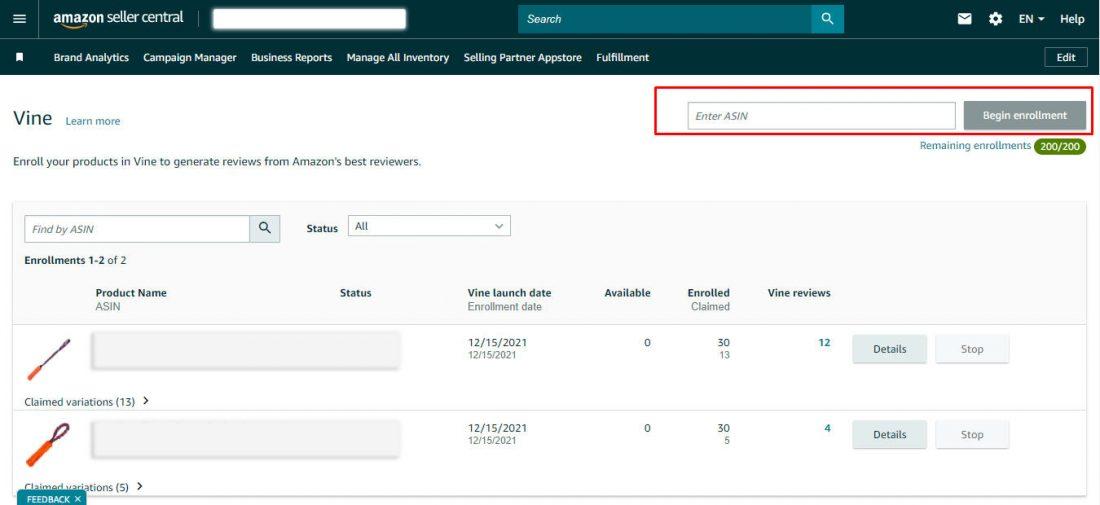
Enroll the Product:
Enter the ASIN in the search box.
Click Begin Enrollment.
Verify product details.
Select number of units (1–30 for standalone; add variations if needed).
Agree to terms and confirm.
Track Progress — Monitor status, shipped units, and reviews in the Vine dashboard.
The entire process usually takes under 5 minutes. Reviews typically appear within 2–4 weeks.
Quick Tips for Success
Optimize your listing (strong images, A+ Content, keywords) before enrolling.
Enroll early — best for products with 0–10 reviews.
Choose quality products — Vine Voices give detailed, honest feedback.
Do not contact reviewers (strictly prohibited).
Combine Vine with PPC for faster sales momentum.
Pros and Cons
Pros: Trusted reviews, faster ranking potential, valuable feedback.
Cons: Upfront cost + free units, no review guarantee, risk of critical feedback.
FAQ
Can anyone join Amazon Vine as a seller?
No — you need a Professional account + Brand Registry.
Is Vine available for pre-launch products?
Yes, as long as you have a customer-ready FBA listing with a future launch date.
How many reviews can I get?
Up to 30 per parent ASIN.
Ready to get honest reviews? Log into Seller Central → Advertising → Vine and start enrolling.
Have you tried Amazon Vine yet? Share your results in the comments!